Car Key Smart Car Remote Lock
- 0.0
- Rating
- 10.00K
- Installs
- Free
- Price
 Analysis by App-foxy
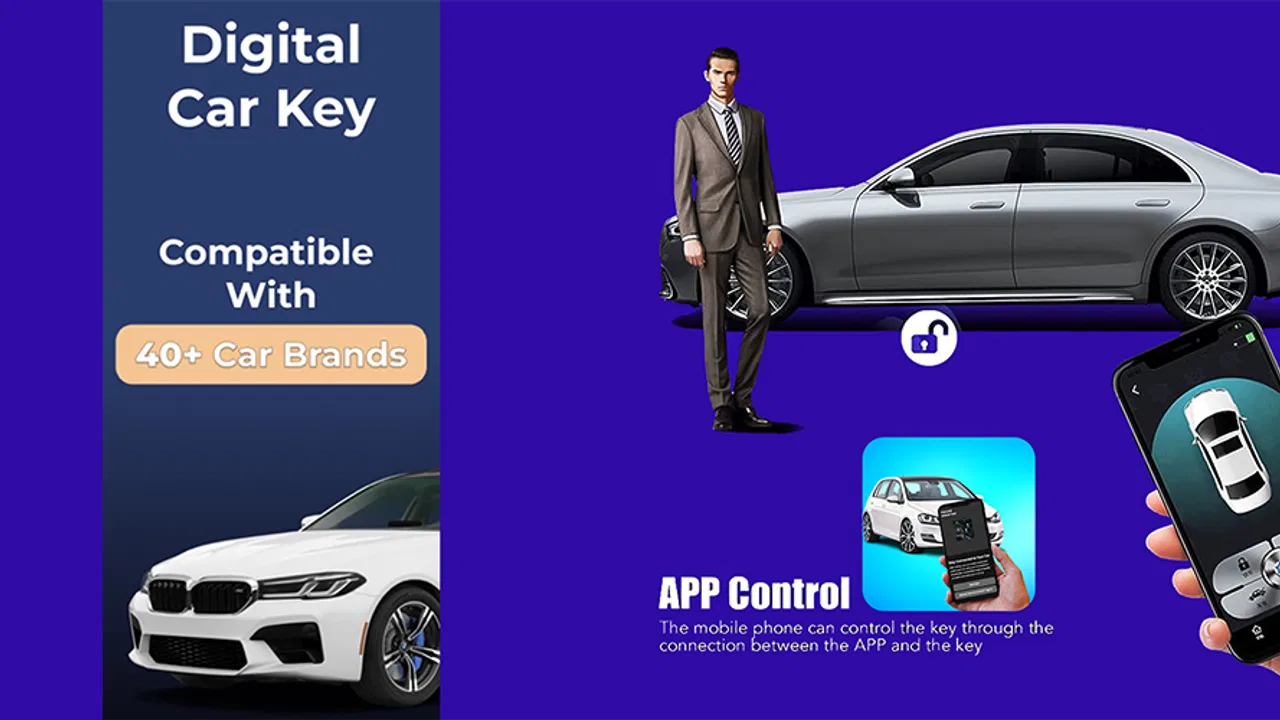
Car Key Smart Car Remote Lock presents itself as a small utility for people who want a more convenient way to think about their vehicle. I approached it as a practical car-related app rather than an entertainment product, and that distinction matters: its appeal depends almost entirely on whether its remote-control and location functions fit your particular vehicle and expectations. The store summary describes control of a vehicle and tracking its location, while the short description reduces the idea to “Car Key.” That makes the app easy to understand at a glance, but the real question is how useful that promise feels during ordinary routines.
Developed by seylardback, this free app sits in the Libraries & Demo section and is rated for Everyone. It runs on Android devices using version 7.0 or later, and the current release is version 7.0. It was released on September 20, 2023. Those details make it accessible to a broad range of Android users, including people with older phones, although compatibility with the phone itself is only one part of the experience. The vehicle, its existing systems, and the way the app communicates with it are just as important.
What the app is trying to do in everyday use
The most useful way to understand this app is as a possible companion for two recurring tasks: interacting with a car and remembering where that car is. That could be handy after leaving a vehicle in a large parking area, when checking its position matters more than opening a full navigation application. It could also appeal to someone who prefers keeping car-related actions in one focused place instead of relying on a physical key and several unrelated phone tools.
You May Also Like

 AccuWeather: Weather Radar
AccuWeather Review: A Quick, Clear Forecast for Everyday Decisions
For everyday plans, the best forecast is the one you can understand quickly. AccuWeather makes rain timing, radar, and local conditions easy to act on, with a few trade-offs.

 Hill Climb Racing
Why Hill Climb Racing Still Turns Crashes Into One More Run
A tiny car, a bumpy hill and one more upgrade: Hill Climb Racing keeps resurfacing because its simple chaos makes every near-miss feel personal.

 AliExpress - Shopping App
AliExpress Makes Global Shopping Feel Personal, but Shoppers Bear the Risk
AliExpress turns a global marketplace into a pocket-sized discovery engine. Its reach is useful, its shopping loop compelling, and its trade-offs easy to miss.

 Lords Mobile: Kingdom Wars
Lords Mobile Is a Kingdom-Building Routine, Not a Quick Match
A case-by-case verdict on the building, battles, device demands, and social commitments that make Lords Mobile rewarding for some players and exhausting for others.

 PDF Scanner app - TapScanner
TapScanner Makes Paperwork Easier to Capture, Check, and Share
TapScanner makes scanning with a phone feel less like a rescue operation and more like a dependable step in getting work done. Its capture tools are useful, though not flawless.

 Block Blast!
 Shows How Much a Puzzle Game Can Leave Out
A quiet grid game shows why puzzle players increasingly value instant clarity, repeatable skill and low-pressure play—and where the genre still needs to catch up.
More From Our News Desk
View All News


I would not treat the name alone as proof that every car becomes a fully functional remote vehicle. A smart-key experience depends on more than an app icon. Before relying on it, I would first check whether my vehicle is genuinely compatible and whether the intended controls work with that vehicle. This is the most important practical step because a polished interface cannot overcome a missing connection between the phone and the car.
That compatibility-first approach also answers one of the questions a new user is likely to have: can this replace a normal key immediately? I would not plan a daily commute around that assumption until the app has been tested with the actual vehicle. A physical key or the manufacturer’s established system remains the safer fallback during the first few uses. In my view, this is not unnecessary caution; remote vehicle tools need to be judged by dependable behavior in the user’s own situation, not just by the wording of the app name.
Speed expectations before depending on it
The app’s basic concept suggests a quick interaction, but I would separate the speed of opening the app from the speed of completing a vehicle action. The first part may feel immediate on a reasonably maintained phone, while the second can depend on the connection between the device and the vehicle. A user standing beside the car may have a different experience from someone trying to locate or interact with it from farther away.
For that reason, I would use it first in a low-pressure setting. Try it while parked at home, keep the original key nearby, and observe how clearly the app communicates the result of an action. The crucial detail is not merely whether a button responds. It is whether I can tell that the intended vehicle action has actually completed. A remote-control tool that leaves me guessing is less useful than a slower tool with an unmistakable result.
The location side deserves the same practical test. If I open the app after leaving a shopping center, I want the displayed position to help me orient myself rather than create another layer of uncertainty. I would compare what the app shows with the place where I know the car is parked, then repeat the process in a different setting. That simple habit reveals whether the location feature fits my routine before I start treating it as a dependable memory aid.
How it behaves during heavier use
The app may appear simple, but car-related tasks become more demanding when several actions happen close together. Imagine arriving home, checking the vehicle’s position, attempting a lock-related action, and then opening another screen to confirm the result. That sequence is a better test than tapping one control once. It shows whether the app remains understandable when I am moving quickly and whether I can recover gracefully if an action takes longer than expected.
Another realistic situation is a busy parking area. I might remember the general section but not the exact row, open the app while carrying bags, and need the location display to reduce the search. In that moment, the best experience is not one filled with extra choices. It is a direct path from opening the app to understanding where the vehicle is. If the interface requires repeated checking or makes the user interpret unclear status information, the convenience advantage becomes smaller.
I would also avoid repeatedly sending the same command simply because the first response is not obvious. That is a useful workflow tip for any remote vehicle tool, but especially here: wait for the app to show a clear outcome before trying again. Repeated taps can make it harder to know which request was successful. A short pause, a visual check, and then a single retry is a more sensible pattern than rapidly pressing the same control.
Resource use is another consideration during extended sessions. A location-oriented tool can be more demanding when it is actively being used than when it is simply closed, but I would not leave it open unnecessarily while walking around for unrelated tasks. Opening it when needed, completing the vehicle check, and closing it afterward is a sensible way to keep the phone focused on the job. This is particularly relevant on older Android hardware, where switching between several apps can already feel less fluid.
Reliability is about recovery, not just success
For me, reliability would be measured by what happens when the ideal sequence breaks. A useful app should leave me with a clear next step if the vehicle does not respond immediately, the location view is not as expected, or the phone needs another attempt. I would pay attention to whether the app returns to a usable state after being placed in the background and reopened, because real users often answer a message, check a map, or unlock their phone before finishing a car-related task.
The safest way to build confidence is gradual use. Start with a vehicle parked where it is easy to see, then try the same workflow from a familiar parking area, and only later consider situations where finding the car is genuinely inconvenient. This staged approach provides a recovery plan instead of turning the first test into a high-pressure experiment. It also reveals whether the app is a helpful convenience or something I would hesitate to trust.
I would keep the physical key available until the app has proved itself repeatedly with my vehicle. That is not a criticism of the developer, seylardback; it is simply the right standard for anything connected to access or control. A location reminder can tolerate some uncertainty because I can keep searching. A lock or remote-control action deserves more careful verification, especially when I am leaving the vehicle unattended.
The app’s average rating is currently 0.0, while its reach is listed at over 10 thousand installs. I read those figures cautiously rather than treating either one as a complete verdict. The install count shows that people have found the app, but it does not tell me whether it suits my particular car. Likewise, the rating alone does not explain the reasons behind individual experiences. The practical test with the intended vehicle remains more informative than a quick glance at either number.
Device limits and the importance of the phone itself
The minimum Android requirement is 7.0, so the app is not restricted to only recent phones. That is helpful for users who keep an older device as a dedicated car companion. Still, an older operating system can bring other trade-offs: slower app switching, less comfortable map viewing, or weaker overall responsiveness. I would rather use a phone with a stable battery and a clear screen than choose a device solely because it technically meets the minimum requirement.
A dedicated spare phone could be useful for a household that wants one device reserved for vehicle tasks, but it should not be treated as a guaranteed solution. The phone still needs to be available when the car is needed, and the user must be able to recognize whether the app has completed an action. A forgotten device with a nearly empty battery is no more helpful than a forgotten physical accessory.
Screen size also changes the experience. On a compact phone, a location view may require more zooming and panning, which can slow down the simple act of identifying a parked car. On a larger screen, the same information may be easier to interpret at a glance. I would test the app in the actual conditions where I expect to use it, including bright outdoor light and one-handed operation, because convenience often disappears when the display is difficult to read.
There is a second device constraint that is easy to overlook: the phone should be handled responsibly around a vehicle. I would set up the app while parked, not while driving, and avoid interacting with the screen in motion. That keeps the app in its proper role as a parked-car utility rather than turning a convenience feature into a distraction.
Where it compares well with familiar alternatives
The usual alternatives are straightforward. Some people use only a physical key, some rely on a vehicle maker’s official connected-car system, and others use a general map application to remember where they parked. Car Key Smart Car Remote Lock is more focused than a parking note in a map app because its purpose combines vehicle interaction with location awareness. That focus can make it appealing when I want car-related actions in one place.
A physical key still has the advantage of simplicity. It does not need a phone screen, an open application, or a battery that must be maintained. If my main need is reliable access and I do not care about location tracking, the conventional option may remain better. The app becomes more interesting when I regularly forget where I parked or want to explore a phone-based way of managing the vehicle.
An official manufacturer application may be the stronger choice for owners who need a broad set of vehicle-specific services and a clearly established connection to their car. I would choose that route when the vehicle brand already offers a system designed for the exact model. This app is more suitable for someone looking for a focused alternative, provided the actual vehicle connection works as expected. The trade-off is between a narrow, potentially convenient tool and a more formal ecosystem built around one manufacturer.
General parking tools can be better for someone who only wants to save a location. They are familiar, often already installed, and do not require the user to think about car controls. In contrast, this app’s appeal depends on the combined idea of locating and controlling the vehicle. If I never intend to use the remote side, a simpler parking workflow may be easier to understand and maintain.
Who will benefit and who should skip it
I can see the strongest fit for drivers who frequently lose track of their car in large lots, want to experiment with a dedicated car utility, and are willing to test compatibility carefully. It may also suit a household where several people prefer a phone-centered routine and can agree on a consistent way to check the vehicle’s status. The free price removes one barrier to trying it, which makes a cautious trial more reasonable.
I would skip it if I need a guaranteed replacement for a manufacturer-supported key system, if I cannot verify that my vehicle works with it, or if I dislike depending on a phone for access-related tasks. I would also choose another option if my only requirement is remembering a parking spot. In that case, a basic map marker may involve fewer steps and less uncertainty.
One useful habit is to treat the app as a supplement during the learning period. Keep the normal key accessible, test one action at a time, and write down the exact sequence that worked with the vehicle. That small record can prevent confusion later, especially if multiple people use the same car. It also helps distinguish a user mistake from a connection problem without repeatedly experimenting in a stressful situation.
My performance verdict
After looking at the app through ordinary use rather than its name alone, I see Car Key Smart Car Remote Lock as a focused experiment for Android users interested in phone-based vehicle control and location tracking. Its strengths are its clear purpose, free access, broad Android compatibility, and emphasis on two tasks that can genuinely matter in daily life. The most convincing scenario is a parked-car routine where I want to find the vehicle and manage a related action from one dedicated app.
Its main limitation is equally clear: the experience cannot be judged independently of the vehicle and the user’s phone. Speed, stability, and recovery all matter more than a single successful tap. I would not assume that a command worked without checking the result, and I would not leave the physical key behind until repeated tests had built confidence. Those are practical conditions, not minor details.
For a careful user with a compatible setup, the app is worth trying because it is free and its purpose is easy to understand. For someone seeking a fully established connected-car platform or a simple parking-memory tool, another option may be a better match. My recommendation is therefore measured: install it as a trial, test it while parked, learn how it behaves during a few realistic routines, and keep it only if it makes those routines genuinely easier. The best reason to use it is not the promise of a smart key, but the convenience it proves in your own car.
That is where this app ultimately succeeds or falls short. The current version gives Android users a straightforward place to explore the idea, and its Everyone rating makes the concept approachable for a wide audience. Yet responsible use requires patience: confirm the vehicle response, verify the location, avoid repeated commands, and maintain a dependable backup. If those habits fit the way you drive, this small utility may earn a place in your everyday car routine.
FAQs for Car Key Smart Car Remote Lock
01What features does the Car Key Smart Car Remote Lock app offer?
The Car Key Smart Car Remote Lock app provides a range of features, including remote locking and unlocking of your car, locating your vehicle with GPS, starting the engine remotely, and setting up security alerts. Additional features may include keyless entry and integration with smart home devices for enhanced convenience.
02Is the Car Key Smart Car Remote Lock app compatible with my vehicle?
Compatibility depends on your vehicle’s make and model. The app typically supports cars equipped with smart technology or those that have an OBD-II port. Check the app’s website or contact customer support to confirm if it works with your specific vehicle before downloading.
03Is the Car Key Smart Car Remote Lock app safe to use?
Yes, the app is designed with security in mind, employing encryption protocols to protect your data. However, ensure you download it from a trusted source like the Google Play Store or Apple App Store. Regular updates and enabling additional security settings will enhance safety.
04Do I need any additional hardware to use the app?
Some vehicles may require additional hardware, such as an OBD-II adapter, to fully utilize the app’s features. These adapters are usually easy to install and connect to your vehicle’s diagnostic port. Check the app’s compatibility requirements for any necessary hardware.
05How much does the Car Key Smart Car Remote Lock app cost?
The app may offer a free version with basic features, while premium features might require a subscription or one-time purchase. Pricing details can vary, so it’s best to check the app’s official page for the most accurate and up-to-date information regarding costs and available features.
Pros
- User-friendly interface for easy navigation.
- Compatible with multiple car brands.
- Supports remote start and lock features.
- Includes a car finder function.
- Customizable settings for enhanced security.
Cons
- Requires stable internet connection.
- Limited functionality in offline mode.
- Some features need premium access.
- May drain phone battery quickly.
- Compatibility issues with older car models.

Car Key Smart Car Remote Lock
Gallery